This tutorial explains how to add, edit, and delete tempo markings in ScoreTail using the Dorico-style inline popover.
A tempo mark indicates the speed of the music. ScoreTail supports three types of tempo marks.
Shows the exact BPM with a note value. e.g. quarter = 120.
An Italian expression indicating the character and pace. e.g. Allegro, Andante.
Text with a metronome mark. e.g. Allegro ♩=144.
Tempo marks are added through the inline popover triggered from a selected note.
Tip: You can also right-click any note or measure and choose "Change Tempo" from the context menu.
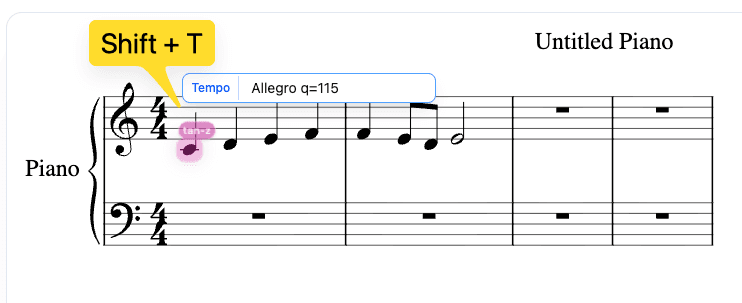
ScoreTail uses a Dorico-style shorthand for entering tempo marks. The following formats are supported:
| Input | Result |
|---|---|
q=120 | ♩ = 120 (quarter = 120) |
120 | ♩ = 120 (quarter note as default) |
e.=72 | ♪. = 72 (dotted eighth = 72) |
Allegro | Text only: "Allegro" |
Allegro q=144 | "Allegro ♩ = 144" (text + metronome) |
| Abbrev. | Note | Symbol |
|---|---|---|
w | whole note | |
h | half note | |
q | quarter note | |
e | eighth note | |
x | 16th note | |
q. | dotted quarter | . |
e. | dotted eighth | . |
Append "." to any abbreviation for a dotted note: q. = dotted quarter, e. = dotted eighth, etc.
As you type a tempo name, ScoreTail shows matching suggestions. Click a suggestion or use the keyboard to select it.
| Tempo Name | Approx. BPM |
|---|---|
| Largo | ~50 |
| Adagio | ~71 |
| Andante | ~92 |
| Moderato | ~114 |
| Allegro | ~132 |
| Vivace | ~166 |
| Presto | ~184 |
Tab / ↑ / ↓ — navigate and confirm suggestions.
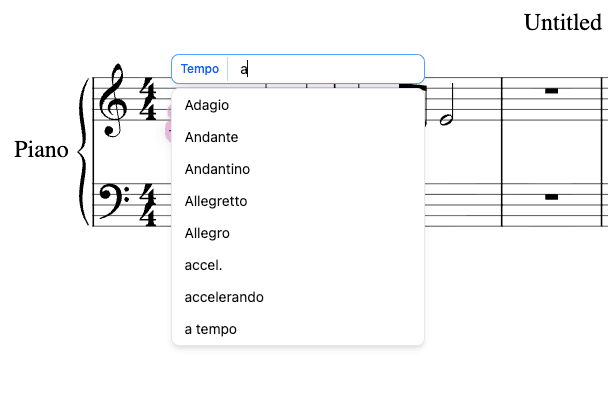
To change an existing tempo mark:
You can also click directly on the tempo marking displayed on the score to open the edit popover.
Open the tempo popover on a note with an existing mark, then use one of these methods:
Clear the input field and press Backspace to delete the tempo mark.
Click the "Delete" button shown on the right side of the popover.
Tempo marks affect the playback speed. When you play back the score, ScoreTail reads the metronome BPM values to determine how fast to play each section. Multiple tempo marks in a piece allow for tempo changes throughout the score.
Tip: If no tempo mark is set, ScoreTail uses a default tempo of 120 BPM (quarter = 120).
