A triplet squeezes three notes into the space of two — a very common rhythm. This tutorial shows how to create triplets and other tuplets in ScoreTail.
The most common is the triplet: three 8th notes fitting into the space of one quarter note. Think of it as splitting a note into more pieces than normal.
| Type | Description |
|---|---|
| Triplet | Triplet (3:2) — three 8th notes in the space of one quarter note |
| Quintuplet | Quintuplet (5:4) — five notes in the space of four |
| Sextuplet | Sextuplet (6:4) — six notes in the space of four |
| Septuplet | Septuplet (7:4) — seven notes in the space of four |
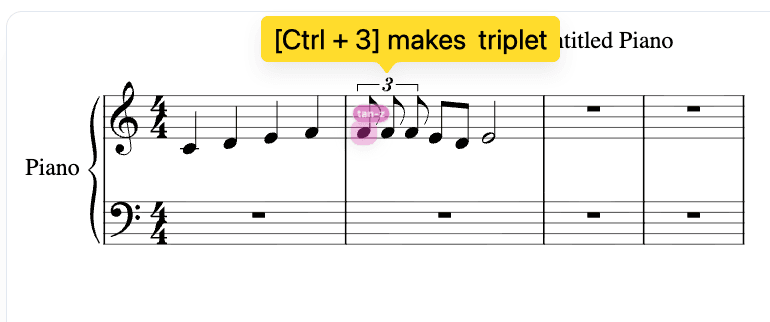
Select a note and press Ctrl+3. The note splits into a triplet instantly.
Each of the three notes is one-third the original duration. You can edit their pitches individually right away.
After pressing Ctrl+3, it should look like this:
The same idea works for other ratios:
| Shortcut | Ratio | Type |
|---|---|---|
| Ctrl+3 | 3:2 | Triplet |
| Ctrl+5 | 5:4 | Quintuplet |
| Ctrl+6 | 6:4 | Sextuplet |
| Ctrl+7 | 7:4 | Septuplet |
You can also right-click any note and choose "Create Tuplet" to pick a custom ratio.
Once the tuplet is created, click any note inside it and edit normally:
Select any note in the tuplet, right-click, and choose "Remove Tuplet". The bracket disappears and the note goes back to its original duration — but the individual pitches won't be kept.
Let's build a simple descending triplet.
